
Generative Writing
Write new content: continue a draft, add a summary, or explain a concept.
Everything AI in the editor starts with Ask AI. With your cursor on an empty line (nothing selected), it helps you write — pick a quick action or describe what you want in your own words.
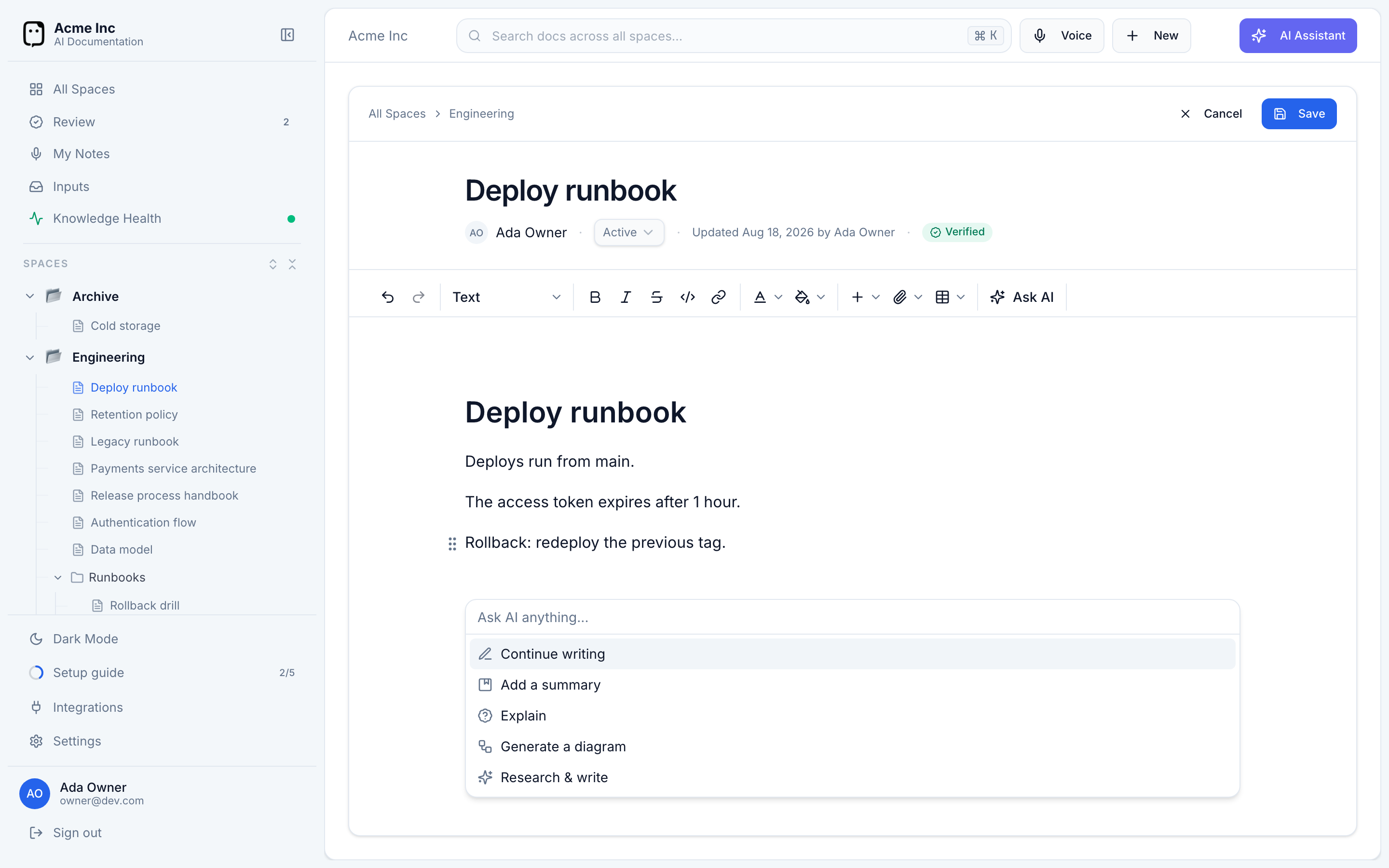
Open Ask AI
Open the menu any of these ways:
- Press ⌘J.
- Click Ask AI in the toolbar.
- Type
/and choose Ask AI from the slash menu.
Writing actions
With no text selected, Ask AI offers:
- Continue writing — picks up from where the document leaves off.
- Add a summary — writes a summary of what's on the page.
- Explain — expands on the current topic.
- Generate a diagram — see Diagrams.
- Research & write — the deeper, grounded writer; see Agentic research.
Or just type your own request into Ask AI anything… — "draft an intro for a runbook", "list the steps to roll back a deploy". Your recent prompts are remembered so you can reuse them.
Review before it lands
Nothing is written to your document until you accept it. Ask AI shows the result in a preview first, then you choose what to do:
- Insert — add it at your cursor.
- Insert below — add it as a new block underneath.
- Try again — regenerate.
- Discard (Esc) — throw it away.
Generative writing works from what's already on the page. For content grounded in your other documents and your codebase, use Research & write instead.