
Plans & Usage
What Free, Pro, and Enterprise include, and how usage is measured.
Docpipe comes in three plans. Free is a generous starting point; Pro unlocks the AI, integrations, and unlimited content most teams want; Enterprise removes every limit.
What each plan includes
| Free | Pro | Enterprise | |
|---|---|---|---|
| Members (seats) | 3 | Unlimited | Unlimited |
| Spaces | 3 | Unlimited | Unlimited |
| Documents | 50 | Unlimited | Unlimited |
| AI questions (Slack & MCP) | 50 / month | 500 per seat / month | Unlimited |
| AI in the editor | — | ✓ | ✓ |
| AI editing runs | — | 40 per seat / month | Unlimited |
| Integrations (Slack, GitHub, Jira, Linear, Confluence) | — | ✓ | ✓ |
| Indexed repositories | — | 20 | Unlimited |
| MCP server & API keys | — | ✓ | ✓ |
| Custom roles | — | ✓ | ✓ |
| Automated PR review | — | ✓ | ✓ |
Pro is billed per seat — $12 per seat per month, or $10 per seat per month billed annually. See Manage subscription to upgrade.
How usage is measured
Some Pro allowances are measured monthly and pooled across your team. The workspace owner can see current usage under Settings → Billing, in Workspace usage:
- Billable seats — your active members plus pending invitations (see Seats & members).
- AI questions — questions answered from your docs, whether asked in Slack or through the MCP server.
- AI editing runs — uses of the editor's AI writing tools, including Research & write.
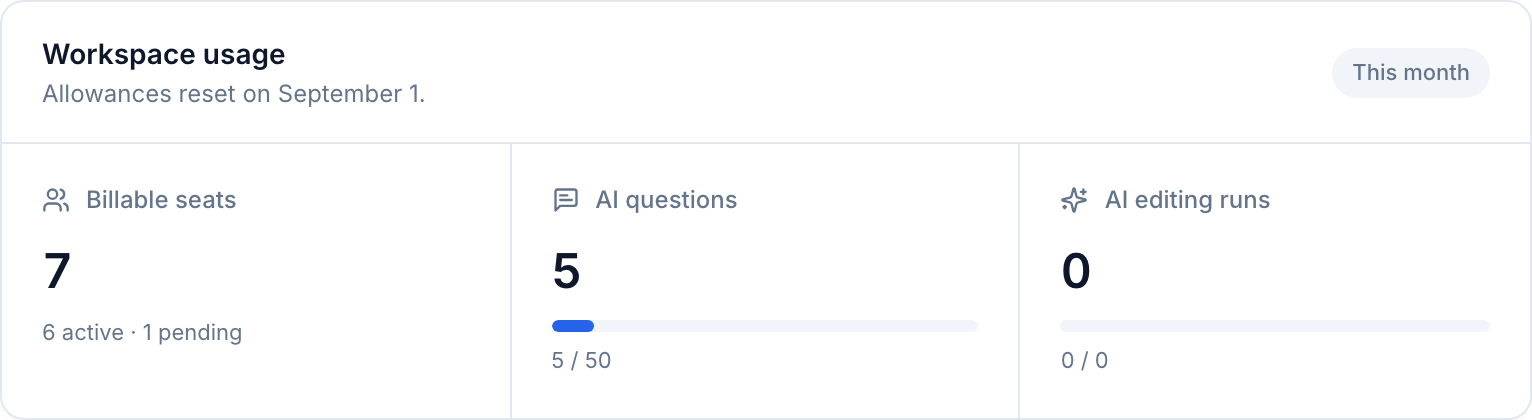
Each meter shows how much of the monthly pool you've used, and the date the allowances reset.
When you reach a limit
You're never blocked without warning. When an action would exceed your plan — creating a document past the cap, using an AI feature Free doesn't include, or exhausting a monthly allowance — Docpipe shows an upgrade prompt explaining exactly which limit you hit and pointing to the billing page.
Reaching a limit never deletes anything. Your existing documents and spaces stay exactly as they are — a cap only limits creating more.