
Experts & SMEs
Assign subject-matter experts so unanswered questions reach the right people.
When Docpipe can't answer a question from your documentation, it can forward it to a subject-matter expert (SME). Experts are assigned per space, so a question about a given area reaches the people who know it — and their answers are captured back into your docs. See When docs can't answer for the asker's and expert's experience.
Assign an expert
- Go to Settings → Experts.
- Choose a space and add the teammates who should be its experts.
- Optionally add expertise tags to describe what they know.
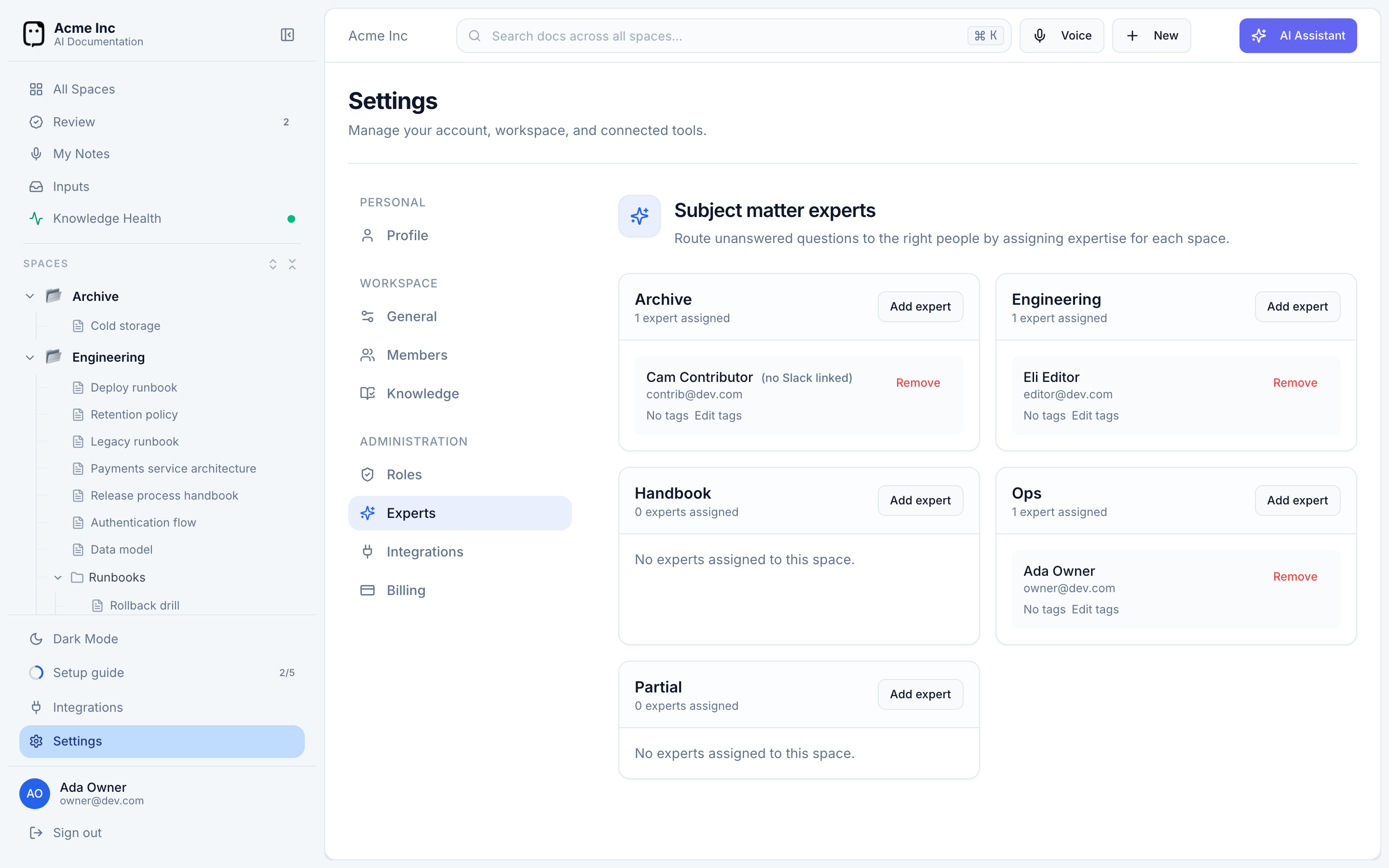
Assigning experts requires being an organization owner or having the Manage space experts permission.
An expert must be able to edit the space's documents — that's what lets their answer become a proposed change. If someone isn't eligible yet, give them editor access to the space and a role with the Edit any document permission, then assign them.
How questions reach the right expert
When a question can't be answered from the docs, Docpipe works out which space it's about — from the documents it searched, or by matching the question to your spaces — and forwards it to that space's experts. If several experts share a space, the first to respond takes it. If no expert is assigned for the topic, Docpipe notifies your organization's owners so they can assign one.
Why it matters
Experts turn a knowledge gap into new documentation. Every forwarded question an expert answers becomes a reviewed doc update, so the next person who asks gets the answer straight from the docs — no expert needed.